

Client communication is one of those everyday business tasks that should feel simple. Whether you are replying to a new lead, sending a project update, sharing an invoice, or following up with a client, your email should be easy to write, easy to personalize, and easy to send.
Today, we are excited to introduce the new 17hats text editor, built to make that experience smoother from start to finish.
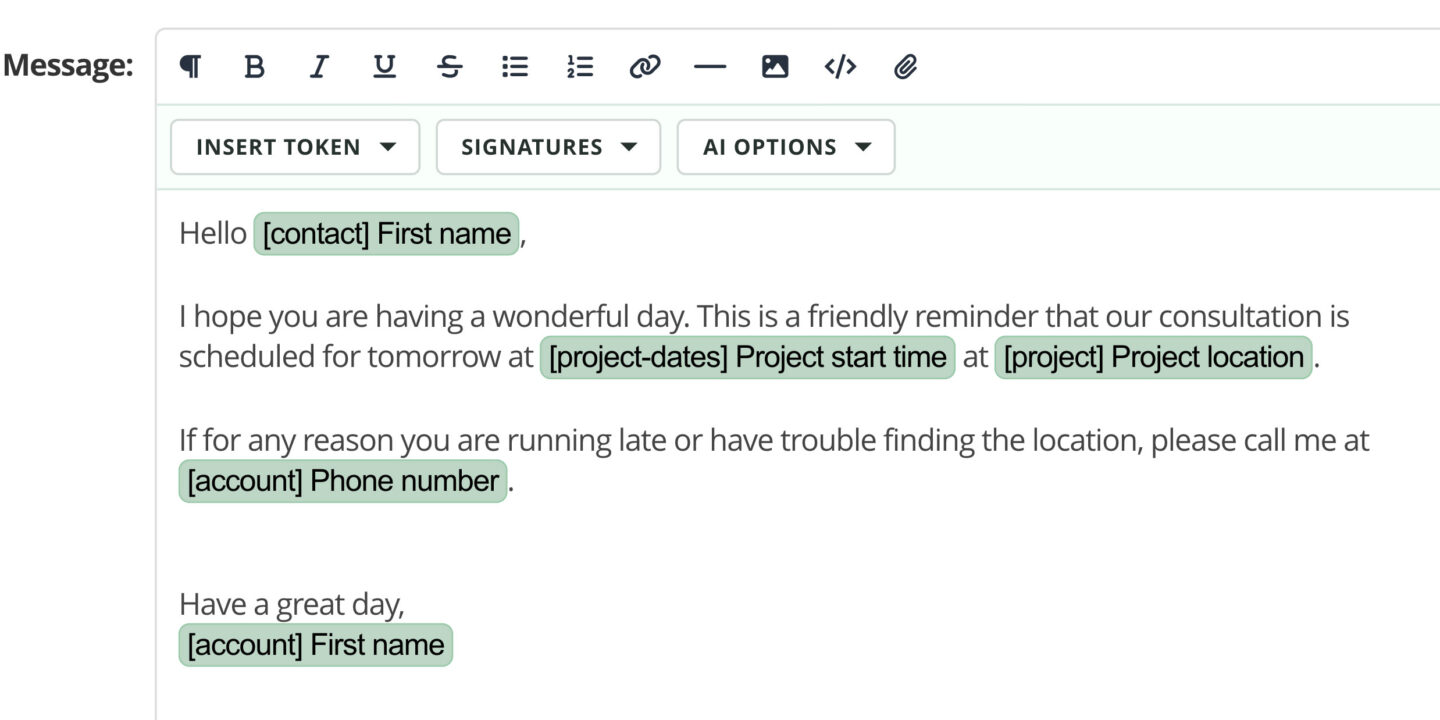
This update gives you a cleaner, more modern editing space with improved controls for formatting, tokens, signatures, images, attachments, and AI-powered writing support. It is designed to help you create polished, personal emails without slowing down the work you are already doing inside 17hats.
A Cleaner Way to Write and Format Emails
The new text editor makes composing emails feel more natural. Formatting tools are easier to find, easier to use, and better organized, so you can focus on the message instead of hunting through menus.
You can format your email with familiar options like bold, italic, underline, strikethrough, bulleted lists, numbered lists, links, horizontal lines, headings, quotes, and code blocks. The toolbar has also been refined so common actions feel faster and more intentional.
The result is a smoother writing experience, whether you are sending a quick reply or building a more detailed client message.
Personalization Is Easier to Reach
Tokens are one of the most powerful parts of 17hats emails because they let you personalize a message without rewriting the same details over and over.
With the new text editor, inserting tokens is more straightforward because you can now search for the token you need instead of scrolling through a long dropdown list. Find client, project, invoice, contract, questionnaire, scheduling, and custom field details faster, then add them exactly where they belong.
That means your emails can stay personal while your process stays efficient.
Better Support for Templates and Signatures
Email templates and signatures are central to how many businesses save time in 17hats, so this release puts extra care into preserving them.
The new text editor is built to better maintain existing email layouts, signature spacing, token placement, and legacy template HTML when you open, edit, swap, or save messages. It also improves how default signatures and reply signatures behave, helping your emails stay consistent without extra cleanup.
For members who rely on templates every day, this means fewer formatting surprises and more confidence when editing saved content.
Images, Attachments, and HTML When You Need Them
The new text editor also improves how visual and file-based content fits into your email workflow.
You can add images by URL, validate image links before inserting them, set image position, add image titles, and optionally link images to a destination. Image resizing has been improved so visuals fit more predictably within the editor.
Attachments are now handled directly from the editor toolbar, giving the compose experience a more unified feel. And for members who prefer more control, the new HTML mode lets you review or edit source content while preserving important email structure.
AI Options, With More Control
The updated editor continues to support AI writing options, now with better awareness of the message you are editing.
When you use an AI option, the editor keeps track of the original version so you can remove the AI change if needed. It also works more carefully around signatures, replies, and available tokens, helping transformed text stay useful in the context of the email you are actually sending.
Built for the Emails You Already Send
This release is not just about a new look. It is about reducing the little moments of friction that can make client communication take longer than it should.
The new text editor helps you:
- Write and format messages with a cleaner toolbar
- Insert personalization tokens more easily
- Preserve templates, signatures, and older email layouts more reliably
- Add images and attachments from one editing space
- Use HTML mode when you need more control
- Apply AI options with an easier path back to your original message
- Send, schedule, save drafts, and save templates with more confidence
A Better Email Experience, Right Inside 17hats
Your emails are often the first, next, or final step in a client experience. They help set expectations, answer questions, move projects forward, and keep your business running smoothly.
The new 17hats text editor is here to make that communication feel easier and more polished, without adding extra steps to your day.
Log in to 17hats and try the new text editor the next time you compose, reply, edit a template, or set up an email reminder.
Latest Posts

How to Stay Top of Mind With Past Clients (No Newsletter Needed)
October 29, 2026
How to Follow Up on a Quote Without Sounding Desperate
October 22, 2026
Inside October’s Journey: From First Inquiry to Paid Invoice
October 15, 2026
How Business Consultants Protect Their Expertise With 17hats
October 9, 2026