

By Danielle Uhl, Certified Coach & Business Consultant, 17hats Ambassador and Marketplace Partner. Adapted from her feature in the September 2026 issue of The Journey.
If your contractors need project details but don’t need access to your account, you’re almost certainly rebuilding the same document from scratch before every job.
Copying questionnaire answers into it. Digging through old emails for the venue address. Double-checking your project notes at nine at night because you’re no longer sure the parking instructions you sent are the ones the client actually confirmed.
It works. That’s the awkward part. Nobody fixes this because nothing is going wrong, exactly. It just quietly costs you an hour per project and leaves you doing detail-checking at an hour of the evening when you’re least equipped for it.
Danielle Uhl’s approach turns that document into something that fills itself in from information the client has already given you. It uses Custom Project Fields, answer mapping, contract templates and project tokens, and it takes one afternoon to build.
Decide what your team actually needs to know
Before building anything, work out what goes in the brief. If you’ve been making this by hand, you already have the answer sitting in your last version of the document. Use it as the template.
For a photographer, that might be client names and contact details, shoot date, time and location, the shot list and priorities, family details or special requests or accessibility needs, and what the lead photographer or assistant is responsible for.
For an interior or landscape designer, it’s more likely the project or installation address, access instructions and the on-site contact, product details, measurements and placement notes, the delivery window and installation timeline, and any client preferences or “do not miss” details.
For an event planner, the client or point of contact and their details, the venue and event schedule, vendor arrival times and contacts, setup and tear down instructions, and additional notes on parking or venue access.
You don’t need every tiny detail in here. What you need is one clear, useful document that lets your team walk into the day prepared instead of texting you questions all afternoon.
Create the Custom Project Fields
Based on the list you just made, create Custom Project Fields to hold that information on every project. In 17hats that’s Account Settings, then Custom Fields.
One thing to keep in mind as you go: these fields appear in every client project you create, so choose ones that make sense across the board. It’s tempting to add a field for the unusual job you booked last March, and you’ll regret it, because you’ll then look at that empty field on every project for the next three years. Anything genuinely one-off belongs in a general “Additional Details” field.
Map your intake questions to those fields
This step is what makes the whole thing automatic, and it’s the one people skip, usually because they don’t realize it exists.
Rather than filling in all these details by hand, consider what you’re already collecting. You’re very likely capturing most of this from the client already, through a Lead Capture Form, Online Scheduling questions, or a Questionnaire.
So go into that specific form, find the questions that contain these details, and use the “map to” option to point each one at the matching Custom Project Field.
Answer mapping, in plain terms, is a setting that takes a client’s answer and files it automatically in a specific field on their project, where other documents can then pull it in. The client answers once. The answer lands where it needs to be. You never retype it.
That’s the whole mechanism, and everything downstream depends on it being set up properly, so it’s worth going slowly here.
Build the brief as a contract template
Here is the part that feels slightly like a trick the first time you see it.
Go to Documents & Emails and create a new Contract template. Name it Internal Project Brief, and set My Signature to Not Required.
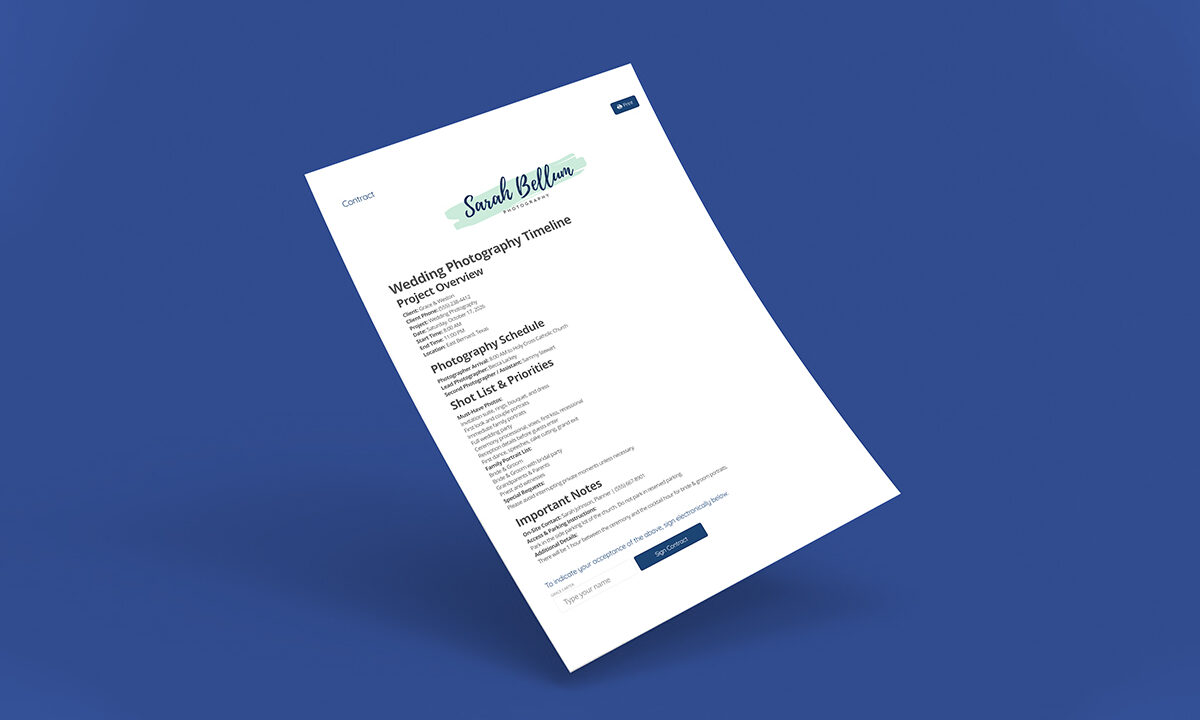
Then build a simple outline using headers and Custom Field tokens. Yours might look something like this:
Project Overview
Client: [contact] Full Name
Client Phone: [contact] Phone Number
Project: [project] Project Name
Date: [project] Project Date
Start Time: [project-dates] Project Start Time
End Time: [project-dates] Project End Time
Location: [project] Project Location
Timeline + Details
Arrival Time: [project] Arrival Time
On-Site Contact: [project] On-Site Contact
Project Timeline: [project] Project Timeline
Important Notes
Access & Parking Instructions: [project] Access
Additional Details: [project] Additional Details
You can add headers for information you’ll fill in manually later, which is useful for the things that vary too much to systematize.
When you generate the Contract from a client’s project, you pick this template, check that the tokens filled in correctly, and add whatever project-specific notes the job needs. Then print it, save it as a PDF, or use the Live View link to share it with the contractors who need it. No account access required on their end.
Add it to the workflow
The last step is the one that makes it stick, and it’s easy to stop before you get here because the template already feels finished.
Add the brief as a step in your project Workflow so it generates at the right moment on every job, whether that’s immediately after booking or a set number of days before the project date.
That’s the difference between a good template and a system. A template is something you remember to use. A system is something that happens.
Why it’s worth the afternoon
This is a simple workaround that you set up once and it keeps working.
Your team gets the details they need. You get fewer last-minute questions. You save the hour you were spending on assembly, and more to the point you stop spending it at nine at night.
There’s a less obvious benefit too. Your business feels more organized and more professional to the people working alongside you, and that matters more than it sounds. Contractors talk to each other. The studios that are easy to work with get first refusal on the good people, and being easy to work with is mostly a matter of whether the information arrives without anyone having to chase it.
Every business has its own moving pieces, which is exactly why your setup should fit the way you actually work rather than the way a template assumes you do.
Questions people ask
What should a project brief include?
The details your team needs to do the job without contacting you: client name and contact, date and time, location and access notes, the schedule, who’s responsible for what, and any client-specific priorities.
How do I share details with contractors without account access?
Generate the brief inside your account, then share the Live View link, a PDF, or a printed copy. They see the project information and nothing else in your account.
What is answer mapping?
It links a question on your intake form to a specific Custom Field on the project, so the client’s answer is stored in the right place automatically and any document using that field’s token fills itself in.
Can a contract template be used for something that isn’t a contract?
Yes, and this is the useful bit. Set My Signature to Not Required and a Contract template becomes a flexible document builder that can pull in tokens. Internal briefs, run-of-show sheets, prep checklists, anything you’d otherwise rebuild by hand.
Pick the document you rebuild most often and look at how much of it is information a client already gave you. That proportion is usually higher than people expect, and it’s the whole case for building this.
If you’d rather work through it with someone, Danielle offers 45-minute 17hats consulting and troubleshooting sessions through the Marketplace for exactly this sort of custom setup.
Custom Fields, answer mapping, contract templates and workflows all come with your 17hats account, so the details a client submits once can end up everywhere they need to be. Start a free 7-day trial.
About the author
Danielle Uhl is a Certified Coach & Business Consultant, 17hats Implementation Expert, and multi-business entrepreneur with 13+ years scaling three profitable businesses from scratch. She blends mindset, strategy, and a human-first approach to help service-based business owners and multipassionates build and streamline their business without overwhelm, so they can focus on what they love and grow with confidence.
As a 17hats Ambassador, Marketplace Partner, and contributor to The Journey, she offers custom 17hats build-outs, consulting, and ready-to-use templates. Her 45-Minute 17hats Consulting + Troubleshooting Session is available through the 17hats Marketplace.
This article is adapted from Danielle’s feature in the September 2026 issue of The Journey, 17hats’ magazine for solo business owners. Read the full issue here.
Latest Posts

How to Stay Top of Mind With Past Clients (No Newsletter Needed)
October 29, 2026
How to Follow Up on a Quote Without Sounding Desperate
October 22, 2026
Inside October’s Journey: From First Inquiry to Paid Invoice
October 15, 2026
How Business Consultants Protect Their Expertise With 17hats
October 9, 2026