
By Donna Lyttle, Online Business Manager and Business Systems Strategist, 17hats Ambassador and Marketplace Partner. Adapted from her feature in the September 2026 issue of The Journey.
Donna Lyttle started using 17hats in 2020 as a Virtual Assistant, and she’ll tell you she wasn’t using it well for a long while. She was focused on the work in front of her: manage clients, track projects, get things done. As new features appeared she experimented with them, and somewhere in there the way she saw the platform shifted.
She stopped looking at 17hats as a collection of individual features and started seeing a system.
Six years later, the lesson she keeps coming back to is this. Automation is great. Visibility into that automation is even better. Which sounds like a small distinction until you’ve lived the alternative, where you built the workflow and the emails presumably went out and two weeks later you’re asking a client whether they ever got the questionnaire, because you have no idea.
That isn’t an automation failure. The automation probably worked fine. You just couldn’t see it.
Pipeline stages, and what they’re for
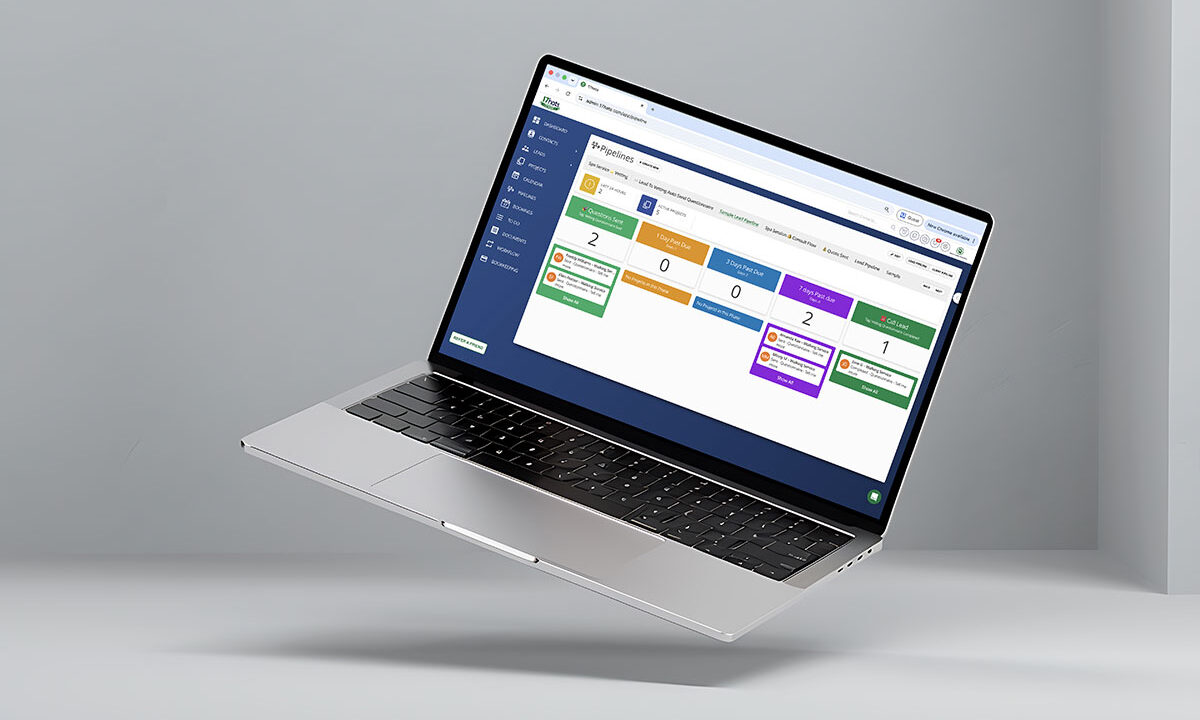
A pipeline is the checkpoints a client passes through from first contact to finished project, laid out as columns you can scan in one look. Each card is a client, each column is a stage, and where the card sits tells you where they are.
A typical service business journey runs something like new lead, discovery, proposal, booked, onboarding, active work, complete. Yours may look nothing like that, and it shouldn’t have to. The labels aren’t the point. The point is that the process becomes something you can look at instead of something you have to hold in your head.
“As a VA, I don’t necessarily need to do every step,” Donna writes. “I just need to know what is happening, what has happened, and where I’m needed.”
That’s true whether you have a VA or you are the entire staff.
Start by asking what actually changes
Before building anything, she suggests answering five questions about your own business. What happens when someone becomes a lead? What has to happen before they become a client? What happens immediately after they book? What happens during the project? What happens when it’s complete?
Then turn those milestones into stages.
Her rule for deciding whether something deserves a stage is a good one: create it because something changes for the client at that point, not because you perform a task there. A useful pipeline answers “what needs to happen next?” If a stage doesn’t help you answer that, it’s decoration, and decoration is what makes boards too crowded to read.
Let the workflow carry the steps
Once you can see where a client is, the next question is what comes after, and that’s where Workflows earn their keep.
Instead of keeping a mental checklist for every client, you build the process once. A new client might need a questionnaire, a contract, an invoice, an onboarding email, a reminder, a follow-up. Rather than recreating those steps every time, you build them once and the system knows the process too.
This is the part most people do get around to building. It’s the next part they skip.
The question that creates visibility
Here is Donna’s best piece of advice, and it costs nothing to adopt.
When you’re building any automation, don’t only ask whether the thing can be automated. Also ask how you will know it happened.
That second question is what separates a system you trust from one you keep double-checking by hand. If an email goes out and nothing visible changes anywhere, you will eventually stop believing the automation and start verifying manually, which puts you back where you started but with more software. If the automation moves a card, applies a tag, or assigns you a to-do, you can look at the board and know.
So you never have to wonder whether somebody did that. You look at the system and it tells you what has already happened and what should happen next.
Knowing where you’re needed
This is the part that changes how the work feels day to day.
You don’t need to manually touch every part of a client process, and if the system is doing its job you shouldn’t. The predictable, repetitive pieces are exactly what software is for.
Your job becomes noticing where a human is actually required. A client hasn’t completed something. A proposal needs real customization. Something unusual has happened that the normal workflow doesn’t cover. That’s where you step in.
The system handles the predictable, and you handle the exceptions. It’s a different way of working than waiting for someone to tell you what to do, and Donna is fairly direct that learning it changed how she thinks about business systems generally, not just about her own clients.
Then keep checking it
Building the system isn’t the finish line. You have to watch it run and notice where things get stuck.
Pay attention to the tasks you’re still creating by hand. If you catch yourself doing the same thing repeatedly, stop and ask whether it should be part of the system.
Sometimes the answer is no. Some things genuinely shouldn’t be automated, and a process that involves judgment or bad news usually belongs to a person. But asking the question is how the system improves, and it’s the habit that keeps a pipeline honest rather than letting it drift eight months out of date while you work around it.
Every few weeks, it’s worth running through the whole thing: where is everyone in the journey, what should be happening at each stage, what is the system handling, where does a human need to step in, and what are you still doing manually that could become part of the system.
Common questions
What are client pipeline stages?
The milestones of your client journey, shown as visual columns so you can see where every client sits at a glance.
How many stages should I have?
Most service businesses land somewhere between five and eight. Add a stage when something meaningfully changes for the client, not for every internal task. Too many and the board stops being scannable, which defeats the purpose of having one.
What’s the difference between a workflow and a pipeline?
The workflow does the work: sends the email, creates the to-do, issues the contract. The pipeline shows the work, letting you see where each client sits as those workflows fire. You want both.
Open your pipelines this week and read them like a page. If you can’t tell in one pass where everyone is and what should happen next, that’s the fix, and it isn’t more automation.
17hats keeps Pipelines, Workflows, Tags and Questionnaires in one account, so the automation and the view of it live together. Start a free 7-day trial.
About the author
Donna Lyttle is an Online Business Manager and Business Systems Strategist, 17hats Ambassador, and Marketplace Partner. She began using 17hats in 2020 as a Virtual Assistant and has since evolved into helping service-based businesses build streamlined systems, workflows, and automations.
Donna brings a practical, visual approach to business operations, helping business owners gain clarity, create consistency, and spend less time managing repetitive processes while keeping the client experience personal and human.
This article is adapted from Donna’s feature in the September 2026 issue of The Journey, 17hats’ magazine for solo business owners. Read the full issue here.
Latest Posts

How to Stay Top of Mind With Past Clients (No Newsletter Needed)
October 29, 2026
How to Follow Up on a Quote Without Sounding Desperate
October 22, 2026
Inside October’s Journey: From First Inquiry to Paid Invoice
October 15, 2026
How Business Consultants Protect Their Expertise With 17hats
October 9, 2026